Designing for
Failure.
Most people build automations to work perfectly. I built this one to see how it would fail. A technical autopsy of Google Apps Script at scale.
The "Hands-Off" Experiment.
I designed a controlled experiment: a 24/7 bank transaction bot. I intentionally avoided touching it for months to surface the weird behaviours that only appear at scale.
Multiplying
Scripts.
After a few months, my Google Drive was full of duplicate script projects. Same code, same name, but different internal IDs.
The Discovery
- Multiple "Bank Bot" projects appearing weekly.
- No human had touched the system or shared the file.
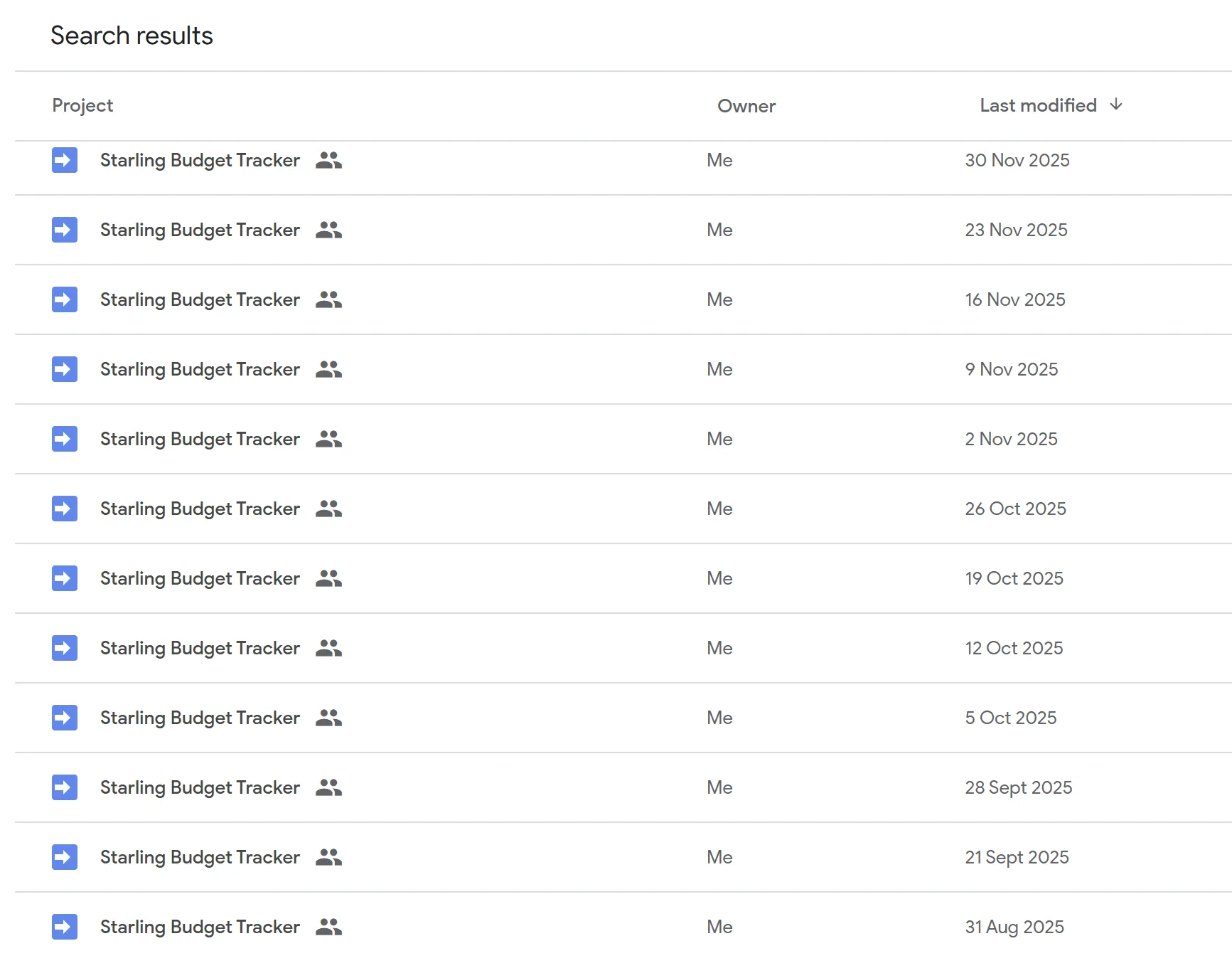
Drive's Secret Life.
Why does this happen? Bound scripts are "sheet-adjacent objects". During maintenance, Drive can re-instantiate the script container silently.
The Container Trap
Bound scripts aren't independent. Drive glitched recovery processes create identical clones.
Silent Execution
Clones don't raise alerts. They silently double-process data, eating integrity from the inside out.
Beyond Tutorials
Tutorials focus on 'easy' bound scripts. Easy is the enemy of production-grade reliability.
How it
Survives.
Monitoring
Real-time logging of Google Apps Script execution times and quotas.
Edge Case Detection
Identifying 'Silent Failures' where scripts exit without errors.
Auto-Recovery
Implementing exponential backoff and retry logic for API timeouts.
Concurrency Control
Using LockService to prevent data collisions in high-traffic sheets.
Fail-Safe Logging
Centralised error reporting for manual engineer review.
Architectural Hardening.
I moved from simple automation to defensive engineering - ensuring the script only executes if its identity is verified and its state is safe.
Standalone Architecture
Pulled the script out of the sheet. Standalone projects are treated as first-class citizens in Drive. No more random clones.
Concurrency Locks
Implemented LockService. Even if a duplicate trigger fires, the system checks for active processes.
Idempotency Guards
Tracking processed IDs ensures the system is 'repeat-safe' - run it 100 times, get the same clean result.
Built to Last.
This experiment directly informs how I build your business systems. Reliability isn't just about what works on Day 1 - it's about what survives Day 100.
Standalone-First
No more 'bound scripts.' All client automations run from standalone projects to ensure a single source of truth.
One-Trigger Ownership
We audit every trigger. They are documented and owned by a single project, stopping accidental parallel execution.
Idempotent Operations
My systems are 'repeat-safe.' If an automation triggers twice, it ignores the duplicate input.
Designed-for-Failure
I don't assume Google will behave perfectly. I design with the expectation that edge cases will happen.
Looking for a Solution
that Lasts?
Don't let your business run on "prototype-grade" automations. Let's map out a production-ready engine for you.
Book a Reliability Audit